IRC configuration
Set your IRC client to authenticate with SASL (not NickServ or /PASS or
anything other than SASL). Use your username as SASL username and the password
you set with ircpasswd as SASL password. Note that it is recommended
that you use a randomly generated password (pwgen is installed on the
server) for IRC because it will be stored with your IRC client configuration.
Host is nerdcafe.tomin.site unless you run your client over SSH on the
server. Port must be 6697 except for localhost is can be 6667. On port
6697 TLS is required and on port 6667 it is not used.
For more instructions on how to use SASL, see Freenode’s help pages.
Examples for irssi
If you connect over SSH to nerdcafe.tomin.site and use irssi there, you may use these commands:
/network add -sasl_username username -sasl_mechanism PLAIN -sasl_password password Nerdcafe
/server add -auto -net Nerdcafe localhost 6667
/save
If you want to connect from outside, use these commands:
/network add -sasl_username username -sasl_mechanism PLAIN -sasl_password password Nerdcafe
/server add -auto -net Nerdcafe -ssl -ssl_verify nerdcafe.tomin.site 6697
/save
Then you may connect with /connect Nerdcafe. Note that recent enough
version of Irssi is required.
If you need more advice, see Freenode’s instructions on how to use SASL with irssi.
Example for HexChat
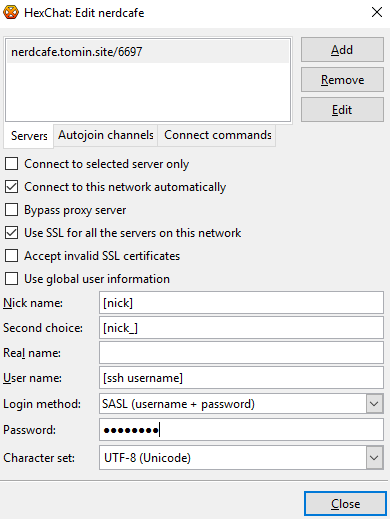
This image was kindly provided by Miffyli.